Hamburger Cross Icon

Earthly Lunar is a Guardrails Engine for your Engineering Stack

Lunar watches your code and CI/CD systems to collect SDLC data from config files, test results, IaC, deployment configurations, security scans, and more.

It continuously evaluates this data against your organization's engineering standards, and enforces them in developer workflows.

How Lunar Works

How Lunar Works

⚙️ Integration Points

Instrumentation
at Scale

Lunar instruments all your code repositories and CI/CD pipelines in a central manner.

No repo-by-repo integration needed.

GitHub App
GitHub App
Integration Point #1
1-click install
How the 1-click install works

Install the Lunar App to your GitHub organization with a single click.

Lunar monitors code changes, then provides automated feedback on pull requests based on your engineering standards.

Reacts to code changes
Provides PR feedback
Provides access to
📄 Source code
🔧 Tech-specific config files
📋 Dependencies & manifests
🔀 Repository metadata
CI/CD Agent
CI/CD Agent
Integration Point #2
1-line change
How the 1-line change works

Add the CI agent to any self-hosted runner by modifying the entrypoint to prepend lunar ci-agent --. The Lunar CI Agent starts up, launches and instruments your CI runner.

No root needed. Because it's the parent process, it has permission to instrument the syscalls of the runner's entire process tree.

Runs alongside CI/CD runners
Detects pipeline processes via syscalls
Compatible with all major CI vendors
Detects globally
Test runs
🔍 Security scans
📦 Build artifacts & SBOMs
🛠️ Tool versions

⚡ Execution Flow

Once instrumented, Lunar automatically runs these steps on every code change

1

Automatic Data Collection

Collect application metadata from:

  • Code and configuration files
  • Tools used in CI/CD
  • Registries and Artifactories coming soon
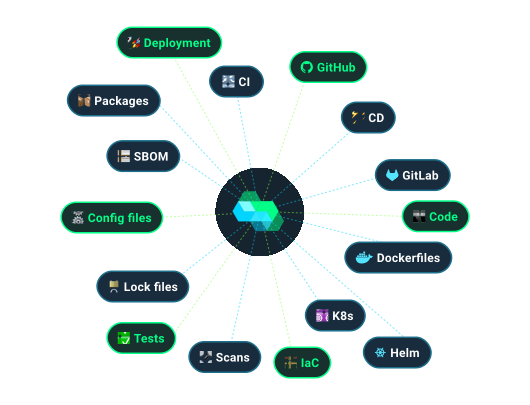
Dockerfiles ☸️K8s YAML Helm Charts 🏗️IaC files 🔍Security scans Tests ⚙️Config files 🔒Lock files 📋SBOMs 🚀Deployment config 🔧Build scripts 📡API specs 🗄️Database schemas 📦Package builds
Tag Cloud Image
...and many more
2

Centralized SDLC data as JSON

A structured JSON document reflects the overall posture of each application in rich detail.

The normalized data is stored in a central database.

{
    "repo": {                           },
    "k8s": {                            },
    "helm": {                           },
    "iac": {                            },
    "dockerfiles": {                    },
    "testing": {                        },
    "sbom": {                           },
    "security": {                       },
    ...
}
3

Real-time Guardrail Feedback

Guardrails define practices to enforce. Lunar's guardrails-as-code verifies that each application's JSON SDLC data abides by defined standards.

Real-time guardrail feedback is provided on every code change, directly in developer PRs.

Checks status Some checks were not successful
PR Fail Icon
PR Check Icon
PR Check Icon

The Result?

Standards that enforce themselves.
No manual checklists. No forever‑backlogged tickets.
No release‑day surprises.

Minutes
Not quarters
100%
Accidental rubber-stamping eliminated
30x
More standards enforced

Example Guardrails

Guardrail Categories

✓ Testing & Quality
Repository and Ownership
Deployment and Infrastructure
DevEx, Build and CI
Security
Operational readiness
Compliance
Use AI ✨

Ensure CODEOWNERS File Exists and Is Valid Example

Step 1: Collect the data

- on: [all-services]
  hook:
    type: code
  runBash: |-
    # Download codeowners-validator
    # from github.com/mszostok/codeowners-validator
    curl -L ...

    # Check if CODEOWNERS file doesn't exist
    if [ ! -f .github/CODEOWNERS ]; then
      lunar collect ".repo.codeowners.exists" false
      exit 0
    fi
    lunar collect ".repo.codeowners.exists" true

    # Validate CODEOWNERS file syntax and format
    if ! codeowners-validator -c .github/CODEOWNERS > validation_output.txt 2>&1; then
      lunar collect ".repo.codeowners.valid" false
      error=$(cat validation_output.txt)
      lunar collect ".repo.codeowners.validation_error" "$error"
    else
      lunar collect ".repo.codeowners.valid" true
    fi

    # Count teams referenced in CODEOWNERS
    teams=$(grep -oP '@\S+' .github/CODEOWNERS | sort -u | wc -l)
    lunar collect ".repo.codeowners.teams_count" "$teams"

Download and use the codeowners-validator tool to check if CODEOWNERS file exists, validate its syntax and format, and count the number of teams assigned.

Step 2: Enforce the guardrail

- enforcement: block-pr
  runPython: |-
    with Check("codeowners", "CODEOWNERS file must be valid") as c:
      c.assert_equals(".repo.codeowners.exists", True)
      is_valid = c.get(".repo.codeowners.valid", False)
      if not is_valid:
        validation_error = c.get(".repo.codeowners.validation_error", "Unknown validation error")
        c.fail(f"CODEOWNERS file validation failed: {validation_error}")

      teams_count = c.get(".repo.codeowners.teams_count", 0)
      if teams_count == 0:
        c.fail("CODEOWNERS file must reference at least one team")

Enforce that all repositories have a valid CODEOWNERS file with at least one team assigned. The validator checks syntax, format, and references.

K8s Manifest Must Define Resource Requirements Example

Step 1: Collect the data

- on: [all-services]
  hook:
    type: code
  runBash: |-
    yq e -o=j -I=0 \
      '.spec.template.spec.containers[].resources' \
      deployment.yaml | jq -s | lunar collect ".kubernetes.deployment.resources" -

Extract resource specifications from Kubernetes deployment manifests.

Step 2: Enforce the guardrail

- enforcement: block-pr
  runPython: |-
    with Check("k8s", "K8s manifest must define resource requirements") as c:
      c.assert_exists(".kubernetes.deployment.resources.requests.cpu")
      c.assert_exists(".kubernetes.deployment.resources.requests.memory")

Verify that CPU and memory resource requests are defined. Block the PR if missing.

Code Coverage Standards Example

Step 1: Collect the data

- on: [all-services]
  hook:
    type: ci-after-command
    pattern: ^codecov.*
  runBash: |-
    lunar collect "codecov.ran" true

Detect if the CodeCov process (pattern: ^codecov.*) is being run in a CI pipeline.

Step 2: Enforce the guardrail

- enforcement: block-pr
  runPython: |-
    with Check("codecov", "Test coverage") as c:
      c.assert_exists(".codecov.ran")

Enforce that all services run CodeCov. Block the PR if not used.

Prevent Dockerfile :latest Tags Example

Step 1: Collect the data

- on: [all-services]
  hook:
    type: code
  runBash: |-
    # Download dockerfile-json
    # from github.com/keilerkonzept/dockerfile-json
    curl -L ...
    
    # Find all Dockerfiles and parse them into JSON ASTs
    find . -name 'Dockerfile' -o -name '*.Dockerfile' | while read -r file; do
      json=$(dockerfile-json "$file")
      echo "{\"path\":\"${file#./}\", \"json\": $json}"
    done > dockerfiles.json
    
    # Combine into an array
    jq -s '.' dockerfiles.json > dockerfile_asts.json
    
    # Extract referenced base images
    jq '[.[] | {path: .path, tags: [((.json.Stages // [])[] | (.From.Image // empty))]}]' \
      dockerfile_asts.json | lunar collect -j ".dockerfile.images" -

Collect all images referenced in FROM statements in all Dockerfiles.

Step 2: Enforce the guardrail

- enforcement: block-pr
  runPython: |-
    with Check("dockerfiles", "Prevent Dockerfile :latest tags") as c:
      imgs = c.get(".dockerfile.images")
      for dockerfile in imgs:
        for image in dockerfile.get("tags", []):
          if ":latest" in image:
            path = dockerfile.get("path", "")
            c.fail(f'File \"{path}\" contains images with \"latest\" tag: \"{image}\"')

Check that no image uses :latest. Block the PR if it does.

Ensure That Production Services Use Snyk Example

Step 1: Collect the data

collectors:
  - on: [all-services]
    hook:
      type: ci-before-command
      pattern: ^snyk.*
    runBash: |-
      lunar collect ".snyk.ran" true

Detect if Snyk security scanning is being run in the CI pipeline.

Step 2: Enforce the guardrail

- enforcement: score
  runPython: |-
    with Check("use-snyk", "Must use Snyk") as c:
      c.assert_exists(".snyk.ran")

Enforce that all production services run Snyk security scans.

Verify Structured Logging Configuration Example

Step 1: Collect the data

- on: [all-services]
  hook:
    type: code
  runBash: |-
    # Check for structured logging libraries
    if grep -qE "(winston|pino|bunyan)" package.json 2>/dev/null || \
       grep -qE "(logrus|zap)" go.mod 2>/dev/null || \
       grep -qE "(structlog|python-json-logger)" requirements.txt 2>/dev/null; then
      lunar collect ".observability.structured_logging.enabled" true
    else
      lunar collect ".observability.structured_logging.enabled" false
    fi

Detect if structured logging libraries are configured in the service dependencies.

Step 2: Enforce the guardrail

- enforcement: block-pr
  runPython: |-
    with Check("structured-logging", "Structured logging must be enabled") as c:
      c.assert_equals(".observability.structured_logging.enabled", True,
        message="Production services must use structured logging (winston, pino, logrus, zap, or structlog)")

Enforce that all production services use approved structured logging libraries.

NIST SSDF: Verify SBOM Generation Example

Step 1: Collect the data

- on: [all-services]
  hook:
    type: ci-after-command
    pattern: ^(syft|cyclonedx|trivy).*sbom.*
  runBash: |-
    lunar collect ".compliance.sbom.generated" true
    # Extract SBOM format if available
    if echo "$COMMAND" | grep -q "cyclonedx"; then
      lunar collect ".compliance.sbom.format" "cyclonedx"
    elif echo "$COMMAND" | grep -q "spdx"; then
      lunar collect ".compliance.sbom.format" "spdx"
    fi

Detect SBOM generation in CI pipelines using tools like Syft, CycloneDX, or Trivy.

Step 2: Enforce the guardrail

- enforcement: block-pr
  runPython: |-
    with Check("nist-ssdf-sbom", "NIST SSDF: SBOM must be generated") as c:
      c.assert_exists(".compliance.sbom.generated",
        message="NIST Secure Software Development Framework requires SBOM generation")
      sbom_format = c.get(".compliance.sbom.format", None)
      if sbom_format not in ["cyclonedx", "spdx"]:
        c.fail("SBOM must use CycloneDX or SPDX format")

Enforce NIST SSDF compliance by requiring SBOM generation in standard formats.

Ensure Public APIs Are Well-Documented Example

Step 1: Collect the data

- on: [all-services]
  use: github.com/earthly/lunar-lib/collectors/claude
  with:
    prompt: Analyze this codebase and identify all public APIs (exported functions, public methods, HTTP endpoints, etc.). For each API, provide 1. The API name (function/method/endpoint name), 2. File path where it's defined, 3. Line number where it starts, 4. A brief summary of what it does, 5. A documentation score from 0 to 1. Consider docstrings, inline comments, parameter descriptions, return value documentation, and usage examples.
    path: ".apis.public"
    jsonSchema: ...

Use Claude AI to analyze the codebase and evaluate documentation quality for all public APIs, scoring each on a 0-1 scale.

Step 2: Enforce the guardrail

- enforcement: report-pr
  runPython: |-
    with Check("api-documentation", "Public APIs must be well-documented") as c:
      for api in c.get(".apis.public", []):
        score = api.get("documentation_score", 0)
        c.assert_greater(score, 0.5, message=f"{api['name']} at {api['file_path']}:{api['line_number']} has score {score:.2f}")

Report in a PR comment if any public API has a documentation score below 0.5, providing detailed feedback on which APIs need better documentation.

100+ Guardrails Off the Shelf

Repository

Repository and Ownership

Documentation: README standards, runbook location, required links
Ownership: CODEOWNERS validation, HRIS cross-reference
Settings: branch protection, merge requirements
Catalog: service registry integration (Backstage, etc)
Configuration: required dot files present and valid
Deployment

Deployment and Infrastructure

Kubernetes: resource limits, non-root containers, min replicas
IaC: Terraform validation, WAF/DDOS config, tagging
CD pipelines: dry-run validation, approval gates
Security: encryption in transit and at rest
Lifecycle: no stale deployments, delete protection
Testing

Testing and Quality

Unit tests: coverage thresholds, framework standards
Integration tests: required for APIs, conventions enforced
Performance tests: load testing procedures, benchmarks
CI execution: tests run in pipeline and deployed version
Test quality: fast execution, no flaky tests
DevEx

DevEx, Build and CI

Golden paths: approved runtimes, frameworks, and templates
Dependencies: pinned versions, no EOL or restricted libraries
Images: approved base images and registries, proper labels
Artifacts: signed and published to approved locations
Build quality: reproducible builds, performance standards
Security

Security and Compliance

Scanning: SAST, SCA, container and artifact scanning
Vulnerabilities: critical issues fixed within SLA
SBOM: software bill of materials generated and published
Secrets: no plaintext secrets, approved vault usage
Compliance: SOC 2, NIST/SSDF, PCI-DSS, ISO 27001
Operational

Operational Readiness

Documentation: runbooks, SLA/SLO, incident dashboards
On-call: rotation configured, escalation paths, HRIS sync
Observability: structured logging, metrics, distributed tracing
Monitoring: golden signals, health checks, alerting
Resilience: DR procedures, backup validation, anomaly detection

100+ pre-built guardrails across Dockerfiles, Kubernetes, Terraform, CI/CD, security, and compliance.

Plus: Custom guardrail builder to codify your unique standards.

Gradual Enforcement

1
draft
Platform team only
Draft
2
score
Affects app scores
Score
3
report-pr
Comments in PRs
Report
4
block-pr
Blocks pull requests
Block
5
block-deploy
Blocks production
Block

Configure Per Guardrail

policies:
          - name: "ensure-non-root-containers"
            enforcement: block-pr

          - name: "sbom-generation"
            enforcement: report-pr

          - name: "critical-vuln-fixes"
            enforcement: block-deploy

          - name: "new-experimental-check"
            enforcement: draft
Gradual Adoption
Gradual Adoption
Introduce guardrails without disrupting workflows. Teams learn and adapt at their own pace.
Agile
Flexible Control
Adjust enforcement levels per guardrail, team, or repository as requirements evolve.
risk
Risk Management
Critical guardrails can block production while others guide with gentle feedback.

Make a New Guardrail in 5 Minutes

Why Not Just Use CI?

❌ CI Only

Delivery Box
Manual Repo-by-Repo Integration
Every new standard requires modifying CI scripts across thousands of repos, each with different tech stacks.
Heavy Duty
Heavy-Handed Enforcement
CI checks either block entirely or allow everything. No gradual rollout or informational feedback.
Business
Quarters to Roll Out
A single standard update takes multiple quarters to coordinate across dozens of teams.
No Visibility
No Global Visibility
Status is scattered across thousands of CI pipelines. Leadership can't see the big picture.

✅ Earthly Lunar

Central Instrumentation
Deploy once, enforce everywhere. No repo-by-repo integration or CI script modifications needed.
Gradual Enforcement
Gradual Enforcement
Draft → Score → Report → Block PR → Block Deploy. Fine-grained control for smooth adoption.
Minutes to Deploy
Minutes to Deploy
New guardrails applied org-wide instantly. Change enforcement levels with a simple config update.
Executive Dashboard
Executive Dashboard
Real-time status across all services. Leadership sees adherence trends and gaps instantly.
The Right Tool for the Job
Use CI for builds and tests. Use Lunar for organization-wide guardrails.

Ready to Automate Your Standards?

See how Lunar can turn your engineering wiki, compliance docs, or postmortem action items into automated guardrails with our 100+ built-in policies.

Works with any process
check Infrastructure conventions
check Post-mortem action items
check Security & compliance policies
check Testing & quality requirements
Book a Demo
See it work with your own use cases
See How It Works