How to Build Node.js Application with Bazel

In this Series
Table of Contents
Bazel is an open-source build tool to speed up your builds and tests. Bazel is generally used on very large projects to scale the organization’s codebase. Bazel is a multilingual build system. This guide will help you run and build Bazel with Node.js apps. We will create a Bazel workspace from scratch to build and test Node.js code.
Prerequisites
To follow along with this article, it is helpful to have the following:
- Basic knowledge of working with JavaScript.
- Node.js installed on your computer.
- Bazel installed on your computer.
Setting Up the Bazel Environment

Open your code editor in your preferred working directory. Create two files on the root directory:
WORKSPACE.bazel: For defining the workspace environment.BUILD.bazel: For defining builds.
Edit the WORKSPACE.bazel as explained in the following step-by-step instructions:
Start by defining the workspace by giving it a name. Preferably the name of the directory you are currently working at.
workspace(
    name = "your_workspace_name",
)- Load the
http_archivepackage and define it:
load("@bazel_tools//tools/build_defs/repo:http.bzl", "http_archive")

http_archive(
    name = "build_bazel_rules_nodejs",
    sha256 = "c29944ba9b0b430aadcaf3bf2570fece6fc5ebfb76df145c6cdad40d65c20811",
    urls = ["https://github.com/bazelbuild/rules_nodejs/releases/download/5.7.0/rules_nodejs-5.7.0.tar.gz"],
)- Load the Bazel Node.js rules dependencies and call the function after loading:
load("@build_bazel_rules_nodejs//:repositories.bzl",\
 "build_bazel_rules_nodejs_dependencies")

build_bazel_rules_nodejs_dependencies()- Load Node.js from node_repositories and call it too:
load("@build_bazel_rules_nodejs//:index.bzl", "node_repositories")

node_repositories()- Load NPM and define the residing place for
package.jsonandpackage-lock.json:
load("@build_bazel_rules_nodejs//:index.bzl", "npm_install")

npm_install(
    name = "npm",
    package_json = "//:package.json",
    package_lock_json = "//:package-lock.json",
)
On the project root directory, create a package.json file. Edit the package.json file as below:
{
    "name":"your_project_name",
    "version":"0.0.1",
    "dependencies": {
        "express":"4.17.3" // for creating a Node.js web server
    },
    "devDependencies": { // jasmine : Bazel's test runner
        "@bazel/jasmine": "5.3.0",
        "jasmine":"4.0.2",
        "jasmine-core":"4.0.1"
    }
}- Install the above dependencies using Bazel by running the following command:
bazel run @nodejs_host//:npm -- installFrom the above command, Bazel will create a couple of additional directories for managing the Node.js dependencies: package-lock.json and node_modules.
Implementing and Testing a Simple Calculator Application

Let’s now test the create Bazel environment using a Node.js application. On the project root directory, create a directory and name it apps. Inside the apps directory, create a simple_calculator directory. Inside the simple_calculator, create three files:
calculator.js: For defining the logic. Editcalculator.jsas follows:
module.exports = class Calculator {
    subtract(x,y){ // returning subtraction of two numbers.
        return x - y;
    }
}calculator.spec.js: For defining the testing logic. Editcalculator.spec.jsas follows:
const Calculator = require('./calculator');
const calculator = new Calculator();

it('10 - 4 = 6 >', () => {
  // testing the result from the calculator class if it will equal 6
    const expected_value = 6;
    expect(calculator.subtract(10,4)).toEqual(expected_value);
})BUILD.bazel: For defining the Bazel build dependencies and steps. EditBUILD.bazelas follows:
load("@npm//@bazel/jasmine:index.bzl","jasmine_node_test")
#loading the node dependencies

filegroup(
    name="node_calculator",
    srcs=["calculator.js"],
    visibility = ["//apps/node_web:__pkg__"]
    #full visibility of the apps folder
)

jasmine_node_test(
    name="calculator_test", # name
    srcs=["calculator.spec.js"], # spec files
    data = [":node_calculator"]
)
To test the functionality, run the following command:
bazel test //...Your response should be similar to:

Exposing the Calculator Application On a Web Server
Let’s Now load the calculator app to the web while implementing the Bazel builds. Create another directory on the apps folder and name it node_web. In the node_web folder, create two files:
index.js: For starting the web server and handling routes. Edit theindex.jsas follows:
const express = require('express');
const Calculator = require('../node_calculator/calculator');

const app = new express();
const calculator = new Calculator();

app.get('/',(req,res) => {
    res.send(`The result of 10 - 4 = ${calculator.subtract(10,4)}`);
})

app.listen(8080, () => console.log(`listening on port 8080`));BUILD.bazel: For handling the Bazel build steps. Edit theBUILD.bazelas follows:
load("@build_bazel_rules_nodejs//:index.bzl", "nodejs_binary")

nodejs_binary(
    name = "node_web",
    data = [
        "//apps/node_calculator:node_calculator",
        "@npm//express:express"
    ],
    entry_point = ":index.js",
)
Run the project by executing the following command:
bazel run apps/node_webYou will get such a response on the terminal:
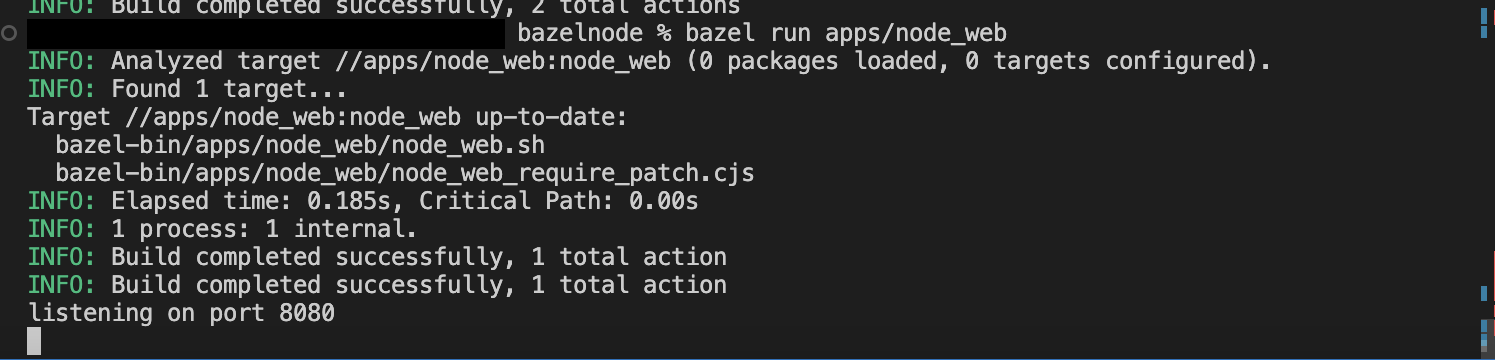
From above, the server is running on port 8080. Proceed to http://localhost:8080. You will get the following calculator response:

Conclusion
This guide helped us create Node.js with Bazel. We were able to configure Bazel, set up Bazel builds, and, most importantly, run tests using Bazel for the Node.js app. I hope you found this guide helpful.
Bazel isn’t the only solution for the automation of building and testing software. Earthly provides a convenient framework to build images or stand-alone artifacts by leveraging containers for the execution of pipelines.
A Earthfile for building, testing, and containerizing our app could look like this:
VERSION 0.7
FROM node:14
WORKDIR /app

deps:
    COPY package.json package-lock.json ./
    RUN npm ci

build:
    FROM +deps
    COPY . .
    RUN npm run build

test:
    FROM +build
    RUN npm test

run:
    FROM +build
    ENTRYPOINT ["npm", "start"]
    SAVE IMAGE --push npm-example:latest
Earthly combines the best ideas from Dockerfiles and Makefiles into one specification, making the containers self-contained, repeatable, portable, and parallel.
Turn your engineering standards into automated guardrails that provide feedback directly in pull requests, with 100+ guardrails included out of the box and support for the tools and CI/CD systems you already have.